점 프로그램
점과 색깔점을 배열에 저장해서 점을 관리하는 프로그램을 만들어 보았다.
요구사항
Point : x,y
ColorPoint : 색
점을 최대 3개까지 저장
Point[] datas=new Point[3]; >> 배열
point.move(); // ++
point.move(10); // +10
point.printInfo();
|
1
2
3
4
5
6
7
8
9
10
11
12
13
14
15
16
17
18
19
20
21
22
23
24
25
26
27
28
29
30
31
32
33
34
35
36
37
38
39
40
41
42
43
44
45
46
47
48
49
50
51
52
53
54
55
56
57
58
59
60
61
62
63
64
65
66
67
68
69
70
71
72
73
74
75
76
77
78
79
80
81
82
83
84
85
86
87
88
89
90
91
92
93
94
95
96
97
98
99
100
101
102
103
104
105
106
107
108
109
110
111
112
113
114
115
116
117
118
119
120
121
122
123
124
125
126
127
128
129
130
131
132
133
134
135
136
137
138
139
140
141
142
143
144
145
146
147
148
149
150
151
|
package class01;
import java.util.Scanner;
/*
*
*/
// Object
// JAVA의 최상위 클래스
//[다형성]
class Point {
int x;
int y;
Point (int x,int y) {
this.x=x;
this.y=y;
System.out.println("로그 : 부모 생성자 호출됨");
}
void move() {
}
void move(int x) {
}
void printInfo() {
}
@Override
public String toString() {
return "("+this.x+","+this.y+")";
}
}
class ColorPoint extends Point {
String color;
ColorPoint(int x,int y,String color) {
super(x,y);
this.color=color;
System.out.println("로그 : 자식 생성자 호출됨");
}
@Override
public String toString() {
return this.color+"("+this.x+","+this.y+")";
}
}
public class Test01 {
public static void test(double d) {
}
public static void main(String[] args) {
test(3); // int 가 double에 소속되어있다.
Point p=new Point(1,2);
System.out.println(p.toString());
// p.toString()
// p라는 객체를 문자열화 시켜줘
Scanner sc=new Scanner(System.in);
Point[] datas=new Point[3]; // 3개까지 저장할 수 있다.
datas[0]=new Point(1,2);
datas[1]=new ColorPoint(10,20,"파랑");
int cnt=2; // 현재 저장된 점의 개수
while(true) { // 메뉴
System.out.println("1. 점 추가");
System.out.println("2. 전체점 목록 출력");
System.out.println("3. 점 움직이기");
System.out.println("0. 프로그램 종료");
System.out.print("메뉴 입력 >> ");
int menu=sc.nextInt();
if(menu==0) { // 0을 눌렀을때
break; // 프로그램 종료
}
else if(menu==1) { // 1. 점 추가
System.out.println("1. 점");
System.out.println("2. 색깔점");
System.out.print("번호 입력 >> "); // 점과 색깔점 중 고를 수 있게 선택지 부여
int num=sc.nextInt();
if(num==1) {
System.out.print("x 좌표 입력 >> "); // x 입력
int x=sc.nextInt();
System.out.print("y 좌표 입력 >> "); // y 입력
int y=sc.nextInt();
datas[cnt++]=new Point(x,y); // x,y 입력한 점을 새로운 데이터로 배열에 저장, cnt 늘어남
}
else {
System.out.print("x 좌표 입력 >> ");
int x=sc.nextInt();
System.out.print("y 좌표 입력 >> ");
int y=sc.nextInt();
System.out.print("색 입력 >> ");
String color=sc.next();
datas[cnt++]=new ColorPoint(x,y,color);
}
}
else if(menu==2) { // 2. 전체점 목록 출력
for(int i=0;i<cnt;i++) { // 전체출력 반복문
System.out.println(datas[i].toString());
// 점 객체가 printInfo()를 수행합니다.
// 점 --->>(x,y)
// 색깔점 --->> 색(x,y)
// "동적바인딩"이 발생했다!
// "다형성"을 실현할수있다!
// == 똑같은 메서드를 수행시키더라도
// 메서드 수행 주체가 어떤객체냐인지에따라
// 다른 메서드가(오버라이딩된 메서드가) 수행되는 것
}
}
else if(menu==3) { // 3. 점 움직이기
}
else { // 0~3 중 누르지 않았을 때, 유효성 검사
System.out.println("잘못된 메뉴입니다.");
}
}
}
}
|
cs |
|
1
2
3
4
5
6
7
8
9
|
public class Test01 {
public static void test(double d) {
}
public static void main(String[] args) {
test(3); // int 가 double에 소속되어있다.
|
cs |
double d=3, 정수를 입력했는데
오류가 생기지 않는다.
왜냐하면 int(정수)는 double(실수)에 속해있기 때문에 상속되어 오류가 생기지 않는다.
ex) Animal a= new Dog();
동물 저장될 수 있는 공간 a = 강아지 객체;
동물 저장될 수 있는 공간 a에
강아지 객체를 저장해주세요.
오버로딩과 오버라이딩의 정의
1. 오버로딩
== 함수명 중복정의 허용
함수명(메서드명)이 같은데, 메서드 시그니쳐(input)가 다를때 발생한다.
상속과 무관하다.
2. 오버라이딩
== 메서드 재정의
상속관계에서만 발생한다.
메서드명도 같고, 메서드 시그니쳐도 같아야한다.
이후 "동적바인딩"이 발생한다.
그로인해 똑같은 메서드를 수행시키더라도 "다형성"을 실현할수있다!
2-1. 동적바인딩
메서드 수행 주체가 어떤객체냐인지에따라
"코드의 변화 없이" 다른 메서드가(오버라이딩된 메서드가) 수행되는 것
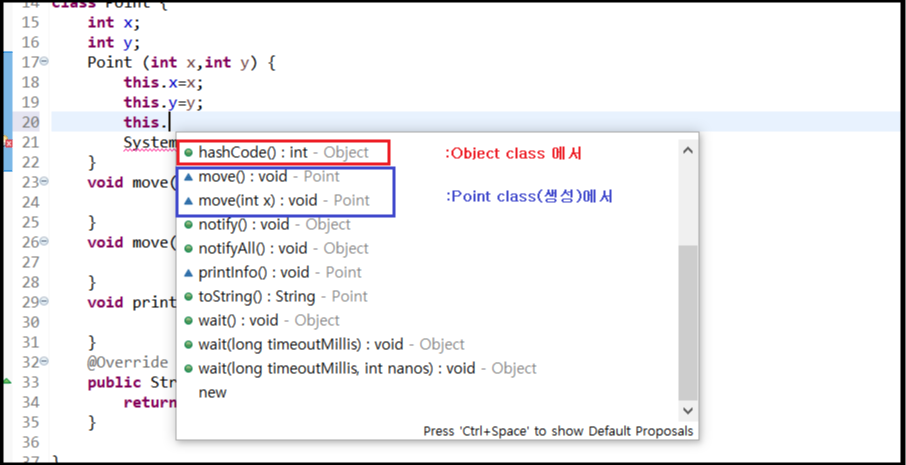
Object
== JAVA의 최상위 클래스
Object는 자바에 기본으로 있는 최상위 class로
Object가 제공하는 기능 (.toString(),...) 을 불러올 수 있다.
동물의 숲 프로그램
요구사항
class 주민
String 타입; // 무조건 있음
String 이름; // 주민을 생성할때, 이름을 반드시 설정하면서 만들어야함
hello()
행복함 / 무난함 / 슬픔 / 화남
중에서 1개 랜덤으로 출력함
,야옹 / ,개굴
action(String 도구)
잠자리채 >> 곤충채집
낚시대 >> 생선낚시
삽 >> 땅파기
class 고양이 extends 주민
class 개구리 extends 주민
main()
주민[] datas=new 주민[3];
datas[i] = new 고양이("히죽");
new 고양이("1호");
new 개구리("레이니");
new 개구리("아이다");
클래스(타입,자료형) : 주민, 고양이, 개구리
객체(변수,값,실제 메서드 수행 주체) : 히죽,1호,레이니,아이다,...
|
1
2
3
4
5
6
7
8
9
10
11
12
13
14
15
16
17
18
19
20
21
22
23
24
25
26
27
28
29
30
31
32
33
34
35
36
37
38
39
40
41
42
43
44
45
46
47
48
49
50
51
52
53
54
55
56
57
58
59
60
61
62
63
64
65
66
67
68
69
70
71
72
73
74
75
76
77
78
79
80
81
82
83
84
85
86
87
88
89
90
91
92
93
94
95
96
97
98
99
100
101
102
103
104
105
106
107
108
109
110
111
112
113
114
115
116
117
118
119
|
import java.util.Random;
class Tool {
String name;
Tool(String name) {
this.name=name;
}
void action() {
System.out.println("액션");
}
}
class Fishing extends Tool {
Fishing () {
super("낚시대");
}
@Override
void action() {
System.out.println("생선낚시");
}
}
class Dragonfly extends Tool {
Dragonfly () {
super("잠자리채");
}
@Override
void action() {
System.out.println("곤충채집");
}
}
class Shovels extends Tool {
Shovels () {
super("삽");
}
@Override
void action() {
System.out.println("땅파기");
}
}
class Animal { // 부모 클래스 Animal 생성
String type; // 멤버변수 type
String name;
static String[] datas= {"행복해요","무난합니다","슬퍼요","화납니다"};
static Random rand=new Random();
Animal(String type,String name) {
this.type=type;
this.name=name;
}
void hello() {
// [1] 0 -> 행복, 1 -> 무난, ... : if문
// [2] 감정[] = {행복함/무난함/슬픔/화남} : 배열
int randNum=Animal.rand.nextInt(Animal.datas.length);
System.out.print(Animal.datas[randNum]);
}
void action(Tool tool) {
tool.action(); // 동적바인딩 ==>> 다형성 실현
}
@Override
public String toString() {
return this.type+" 주민 "+this.name;
}
}
class Cat extends Animal {
Cat(String name) {
super("고양이",name);
}
@Override
void hello() {
super.hello();
System.out.println(" 야옹~");
}
}
class Frog extends Animal {
Frog(String name) {
super("개구리",name);
}
@Override
void hello() {
super.hello();
System.out.println(" 개굴~");
}
}
public class Test01 {
public static void main(String[] args) {
Animal[] datas=new Animal[3]; // 주민 3명만 받을거야~
datas[0]=new Cat("1호");
datas[1]=new Frog("레이니");
datas[2]=new Frog("아이다");
for(int i=0;i<datas.length;i++) {
datas[i].hello();
}
/*
for(배열의 타입 변수명:배열의 이름) {
datas[i].hello();
}
*/
for(Animal animal:datas) {
animal.hello();
}
for(Animal animal:datas) {
Tool tool=new Dragonfly();
animal.action(tool);
}
for(Animal animal:datas) {
System.out.println(animal);
}
}
}
|
cs |
지금 기분을 나타내주는 hello() 메서드를 만드는 과정에서
서로 관련이 있고, 개수를 알고있으며, 자료형이 같기에
배열로 지정해주어 단순히 if를 사용해 메서드를 만드는 것 보다
짧게 수정할 수 있었다.
2024.07.11
'JAVA > JAVA' 카테고리의 다른 글
| [JAVA] 04. 캡슐화, 추상화, 인터페이스 (0) | 2024.07.12 |
|---|---|
| [JAVA] 03. 포켓몬 게임 프로그램 작성 (2) | 2024.07.11 |
| [JAVA] 02. 상속 (0) | 2024.07.04 |
| [JAVA] 01-2. class를 활용하여 학생부 프로그램 만들기 (0) | 2024.07.03 |
| [JAVA] 01-1. 멤버변수, 생성자, 메서드 (0) | 2024.07.03 |

