컬렉션
모든 컬렉션이 toString() 오버라이딩 되어있어서 전체출력이 예쁘다는 장점이 있다.
컬렉션에는 다양한 메서드들이 이미 만들어져있다.
또한 원래 자료형 제한이 없다.
1. 배열리스트
ArrayList<> 변수명=new ArrayList<>();
배열리스트는 컬렉션안에 있는 것으로
자료형 제한이 없는데
제네릭을 통해 자료형을 "강제"해서 사용한다.
배열리스트와 배열에 차이점으로는
배열리스트는 개수가 무제한이지만 배열은 개수가 정해져 있다.
공통점으로는 데이터 관련성이 있고 자료형이 정해져 있다.(제네릭을 통해 강제했기 때문)
배열리스트는 인덱스의 순서를 통해 찾을 수 있다.

2. 맵
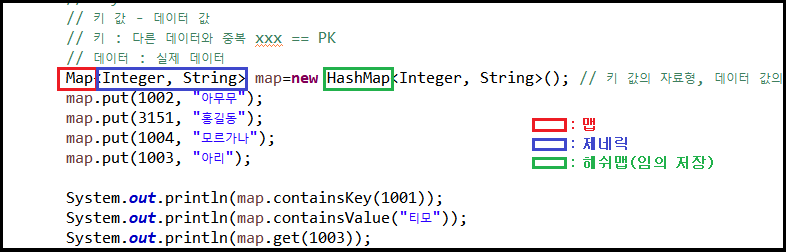
Map<> 변수명=new HashMap<>();
맵은 키 값과 데이터 값을 갖고 있는 배열로
키는 다른 데이터와 중복될 수 없다.
데이터는 실제데이터이다.
배열리스트와 비교하면 배열리스트는 인덱스의 순서를 통해
배열안에 값을 찾을 수 있는 반면에,
맵은 키값을 통해 빠르게 값을 찾을 수 있다.
HashMap은 저장 순서와 상관없이 인덱스에 무작위로 저장되기 때문에
출력시 임의로 출력되고,
LinkedHashMap은 저장 순서에 따라 순서가 유지되며,
TreeMap의 경우 키값의 순서에 따라 저장되어
더 유리한 방법으로 배열을 저장할 수 있다.
컬렉션을 통하여 학생부 프로그램을 만들어 보았다.
|
1
2
3
4
5
6
7
8
9
10
11
12
13
14
15
16
17
18
19
20
21
22
23
24
25
26
27
28
29
30
31
32
33
34
35
36
37
38
39
40
41
42
43
44
45
46
47
48
49
50
51
52
53
54
55
56
57
58
59
60
61
62
63
64
65
66
67
68
69
70
71
72
73
74
75
76
77
78
79
80
81
82
83
84
85
86
87
88
89
90
91
92
93
94
95
96
97
98
99
100
101
102
103
104
105
106
107
108
109
110
111
112
113
114
115
116
117
118
119
120
121
122
123
124
125
126
127
128
129
130
131
132
133
134
135
136
137
138
139
140
141
142
143
144
145
146
147
148
149
150
151
152
153
154
155
156
157
158
159
160
161
162
163
164
165
166
167
168
169
170
171
172
173
174
175
176
177
178
179
180
181
182
183
184
185
186
187
188
189
190
191
192
193
194
195
196
197
198
199
200
201
202
203
204
205
206
207
208
209
210
211
212
213
214
215
216
217
218
219
220
221
222
223
224
225
226
227
228
229
230
231
232
233
234
235
236
237
238
239
240
241
242
243
244
245
246
|
package class03;
import java.util.ArrayList;
import java.util.Scanner;
class Student {
private int num;
private String name;
private int score;
Student(int num, String name, int score){
this.num=num;
this.name=name;
this.score=score;
}
public int getNum() {
return num;
}
public void setNum(int num) {
this.num = num;
}
public String getName() {
return name;
}
public void setName(String name) {
this.name = name;
}
public int getScore() {
return score;
}
public void setScore(int score) {
this.score = score;
}
@Override
public String toString() {
return "Student [num=" + num + ", name=" + name + ", score=" + score + "]";
}
}
public class Test03 {
public static Student hasStudent(ArrayList<Student> datas,int num) {
for(Student data:datas) {
if(num == data.getNum()) {
return data;
}
}
for(int i=0;i<datas.size();i++) {
if(num == datas.get(i).getNum()) {
return datas.get(i);
}
}
return null;
}
public static ArrayList<Student> hasStudent(ArrayList<Student> datas,String searchKeyword) {
ArrayList<Student> al=new ArrayList<Student>();
// 1. 반환할 배열을 생성
for(Student data:datas) {
if(data.getName().contains(searchKeyword)) {
// 2. 이름에 keyword가 들어가있다면,
al.add(data);
// 3. 반환할 배열에 저장
}
}
return al;
// 4. 반환
}
public static void main(String[] args) {
Scanner sc=new Scanner(System.in);
ArrayList<Student> datas=new ArrayList<Student>();
// 배열 역할을 하는 컬렉션 배열리스트
// 학생부 역할
// [샘플 데이터 생성]
int PK=1001; // 시스템에서 부여
datas.add(new Student(PK++,"오리아나",50));
datas.add(new Student(PK++,"모르가나",88));
datas.add(new Student(PK++,"티모",67));
// [전체출력]
// [학생추가]
while(true) {
System.out.println("=== 메 뉴 ===");
System.out.println("1. 학생추가");
System.out.println("2. 전체출력");
System.out.println("3. 번호검색");
System.out.println("4. 이름검색");
System.out.println("5. 평균출력");
System.out.println("6. 점수변경");
System.out.println("7. 학생삭제");
System.out.println("0. 프로그램 종료");
System.out.println("==========");
System.out.print("메뉴입력 >> ");
int action=sc.nextInt();
if(action==0) {
break;
}
else if(action==1) { // 학생추가
System.out.print("이름입력 >> ");
String name=sc.next();
System.out.print("성적입력 >> ");
int score=sc.nextInt();
datas.add(new Student(PK++,name,score));
System.out.println("학생 데이터 추가 완료!");
}
else if(action==2) { // 전체출력
if(datas.isEmpty()) {
System.out.println("출력할 데이터가 없습니다!");
continue;
}
for(Student data:datas) {
System.out.println(data);
}
}
else if(action==3) { // 번호검색 == PK로 검색 == selectOne
if(datas.isEmpty()) {
System.out.println("출력할 데이터가 없습니다!");
continue;
}
System.out.print("번호입력 >> ");
int num=sc.nextInt();
Student data=hasStudent(datas,num);
if(data != null) {
System.out.println("[검색결과]");
System.out.println(data);
}
else {
System.out.println("검색 결과가 없음!");
}
/*
boolean flag=false;
for(Student data:datas) {
if(num == data.getNum()) {
System.out.println("[검색결과]");
System.out.println(data);
flag=true;
}
}
for(int i=0;i<datas.size();i++) {
if(num == datas.get(i).getNum()) {
System.out.println("[검색결과]");
System.out.println(datas.get(i));
// datas[i]==datas.get(i)
flag=true;
}
}
if(!flag) {
System.out.println("검색 결과 없음!");
}
*/
}
else if(action==4) { // 이름검색 == selectAll
System.out.print("검색어입력 >> ");
String searchKeyword=sc.next();
ArrayList<Student> al=hasStudent(datas,searchKeyword);
if(al.size() <= 0) {
System.out.println("검색 결과가 없음!");
continue;
}
System.out.println("[검색결과]");
for(Student s:al) {
System.out.println(s);
}
}
else if(action==5) { // 평균출력
if(datas.isEmpty()) {
System.out.println("출력할 데이터가 없습니다!");
continue;
}
int sum=0;
for(Student data:datas) {
sum+=data.getScore();
}
double avg=sum*1.0/datas.size();
System.out.println("평균 : "+avg+"점");
}
else if(action==6) { // 점수변경
System.out.print("번호입력 >> ");
int num=sc.nextInt();
Student data=hasStudent(datas,num);
if(data == null) {
System.out.println("검색 결과가 없음!");
continue;
}
System.out.print("성적입력 >> ");
int score=sc.nextInt();
data.setScore(score);
System.out.println("변경완료!");
}
else if(action==7) { // 학생삭제
System.out.print("번호입력 >> ");
int num=sc.nextInt();
boolean flag=false;
for(int i=0;i<datas.size();i++) {
if(datas.get(i).getNum() == num) {
flag=true;
datas.remove(i);
break;
}
}
if(!flag) {
System.out.println("검색 결과가 없음!");
}
/*
Student data=hasStudent(datas,num);
if(data == null) {
System.out.println("검색 결과가 없음!");
continue;
}
for(int i=0;i<datas.size();i++) {
if(datas.get(i).getNum() == data.getNum()) {
datas.remove(i);
break;
}
}
*/
}
else {
System.out.println("잘못된 입력입니다!");
}
}
}
}
|
cs |
2024.07.16
'JAVA > JAVA' 카테고리의 다른 글
| [JAVA] 07. condition, 코드의 응집도 및 결합도 (0) | 2024.07.18 |
|---|---|
| [JAVA] 06. MVC 패턴 (0) | 2024.07.16 |
| [JAVA] 04. 캡슐화, 추상화, 인터페이스 (0) | 2024.07.12 |
| [JAVA] 03. 포켓몬 게임 프로그램 작성 (2) | 2024.07.11 |
| [JAVA] 02-1 상속(2) (0) | 2024.07.11 |


